
The Arts · World 5 of 8 · Years 7–8
Beat Makers: Composing with Music Technology
Build a track from nothing: beat, bass, chords and your own recorded sounds. Then play it to a room and watch it land.
Big question: How do music makers use beats, chords and digital tools to make listeners feel something, and how does where they come from shape the music they make?
- You'll make
- A 60–90 second original track made in a browser tool, with at least four layers (beat, bass line, chords and a melody or hook) plus one sound you recorded yourself. The track has a clear structure (for example intro, main section, build, drop, outro) and a deliberate mood. You also write a one-page producer's sheet: your chord loop, the job of each layer, one mixing decision and one musician or tradition that influenced you.
- For
- Classmates, whānau and the school community at a listening lounge, a showcase walk-in, or the screening of a class film
- Time
- 5 weeks · 2 sessions a week
Your mission
Why it matters
Your school wants original music for its end-of-term showcase: walk-in music, a soundtrack for the class film, or a track for a cause the students care about. No copyrighted songs, no downloads: every sound has to be made or recorded by you. You have free browser tools, headphones, a phone for field recordings and five weeks to produce a track people will actually want to hear.
Almost every song you hear today was built on a computer, often in a bedroom. In 2013 Lorde's 'Royals' went to number one in the United States from a small studio in Auckland. Long before that, the Pātea Māori Club's 'Poi E' and Upper Hutt Posse's 'E Tū' took the newest sounds of their time and made them speak for their people. When you understand how beats, bass lines and chords create mood, you listen to music with new ears, and you can use sound to tell your own story about who you are and where you live.

Your first step
Open Chrome Music Lab Song Maker. Make the simplest beat you can: a low drum on beats 1 and 3, a clap on 2 and 4. Now change only the tempo (speed). At what speed does it feel calm? At what speed does it make you want to move?
Make it yours
Choose a context
Same big question, three different places to explore it. Pick the one that fits your class and community.
The sound of our place
Record your neighbourhood: waves dragging stones at the beach, tūī in the school kōwhai, rain on the classroom roof, a bus braking, the canteen at lunchtime, a creek after rain. Turn those field recordings into samples (short sound clips) and build a track that sounds like home. Think about what makes your place different from any other: a rural track might use a gate, a quad bike and magpies; a city track might use a pedestrian crossing and a skate park.
Soundtrack for a story
Composers write music for films, games and adverts so the audience feels exactly what the director wants. Choose a 60-second silent clip (from your class's own stop-motion film, a school event video or a nature clip you are allowed to use) and score it: tension that builds, a chord change when the mood turns, a drop when something big happens. Compare how film composers make you feel danger with just two notes, or hope with a major chord.
A track with a message
Music has always been used to speak up. 'Poi E' (1984) put te reo Māori at the top of the charts at a time when the language was fighting to survive; 'E Tū' (1988) mixed rap with a haka-like chorus to tell Māori history; Pacific artists in South Auckland used hip hop to tell their own stories. Choose a cause your class cares about (Te Wiki o te Reo Māori, a clean local awa, kindness online, a Pacific language week) and make an instrumental track, or one with short spoken or sung lines you wrote, that carries the message.
CREATE
Week by week
Two sessions a week, each with Getting started and Stretch support so the whole class works together.
- W1What makes a track: layers, mood and the musicians who shaped Aotearoa's soundConnect: Inside a track · Respond: Music that spoke for its people
- W2Experiment with beats, chords and your own recorded soundsExperiment: Beats and tempo · Experiment: Chords and mood
- W3Arrange the track: bass lines, structure and building layersArrange: Bass from the roots · Arrange: Structure: intro to outro
- W4Transform the track: mixing, feedback and refiningTransform: Mix it · Transform: Refine and name it
- W5Exhibit: the listening loungeExhibit: Set up the lounge · Exhibit: Play it to a room

Hands-on
Activities
Investigations and projects that fit the weeks above. Open one to see what you need and how you'll know it worked.
Layer huntWhat is every instrument in a track actually doing?Open
You need: headphones · a short track (60–90 seconds) · a layer-map page with four rows: beat, bass, chords, melody
- Listen once just to enjoy it.
- Listen again focusing only on the drums. Mark on your map where they start, stop or change.
- Listen for the bass: the lowest sound. Hum it quietly. Mark where it plays.
- Listen for chords and melody. Which part would you hum later? That is the hook.
- Compare maps with a partner. Where do layers drop out, and what does that do to the energy?
How you'll know: Your map shows when each layer comes in and drops out, and you can explain what the track's texture does at its biggest moment.
Safety: Keep headphones at 60% volume or less.
Go further: Map a track from a different genre (a film cue, a kapa haka recording, a gospel choir) and compare how the jobs are shared out.
Fits week 1 →See, hear, wonder: music that changed AotearoaHow did New Zealand musicians use new sounds to tell their own stories?Open
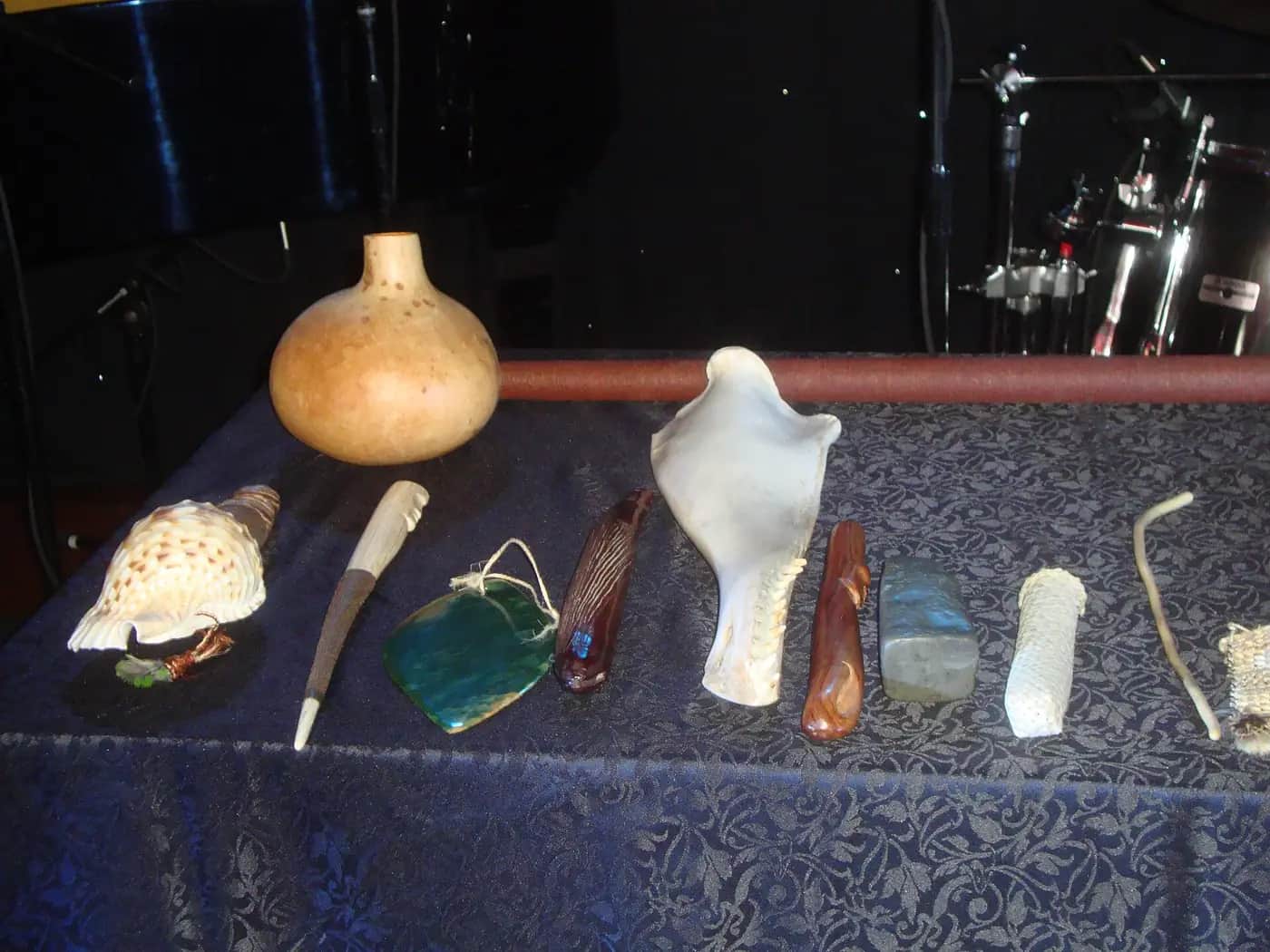
You need: recordings of 'Poi E' and 'E Tū' (NZ On Screen) · a taonga pūoro recording · a three-column page: Hear / Think / Wonder
- Listen to 'Poi E' once for enjoyment.
- Listen again and write only what you hear: instruments, voices, the beat, the language.
- Write what you think the musicians wanted to say, with a clue from the music for each idea.
- Repeat with 'E Tū' and the taonga pūoro piece.
- Write questions you would ask the musicians or a taonga pūoro player to understand the music properly.
How you'll know: Your notes separate what you can hear from what you are guessing, and you can link one musical choice to what was happening in Aotearoa at the time.
Go further: Read the Te Ara page on Māori and Pacific music in the 1980s and 1990s and add one more song to the class timeline.
Fits week 1 →Beat gridHow do tempo and rhythm change the feel of a beat?Open
You need: Chrome Music Lab Song Maker or Ableton Learning Music · headphones · your mood sentence
- Set up a grid of four beats per bar. Put a low drum (kick) on beats 1 and 3 and a clap (snare) on 2 and 4.
- Add a hi-hat or light tap on every half beat.
- Save the link. Now make two more versions: one slower, one faster.
- In one version, move a single kick to an off-beat (between the counts). Does it feel more like it swings or stumbles?
- Choose the version that best fits your mood and write one sentence explaining why.
How you'll know: You have three saved beats at different tempos and can explain how tempo and rhythm changed the feel.
Safety: Take a 2-minute ear break every 20 minutes; headphones at 60% volume or less.
Go further: Build a beat in 3/4 time (three beats in a bar) and compare how it moves.
Fits week 2 →Chord mood swapCan changing the chords change the whole mood, even with the same melody?Open
You need: a keyboard or on-screen keyboard · Song Maker or Learning Music chords · three listeners
- Build C major, G major, A minor and E minor using 'play one, miss one, play one, miss one, play one' from the root.
- Make a major loop: C–G–C–G (tonic and dominant). Make a minor loop: Am–Em–Am–Em.
- Write a short melody of four to six notes and play it over each loop.
- Ask three listeners, without telling them which is which: which version feels brighter, darker, more tense, more hopeful?
- Tally the answers and choose the loop that fits your track's mood.
How you'll know: Listeners mostly hear the mood change you expected, and you can name which chords are major and minor.
Go further: Try C–G–Am–F, then Am–F–C–G. Same four chords, different order: what changes?
Fits week 2 →Field recording and samplingCan sounds from your own place become musical instruments?Open
You need: a phone or tablet with a voice recorder · a partner · a list of three sounds to find
- Plan three sounds linked to your context (a door, footsteps on gravel, rain, a tūī, a basketball bounce).
- Find a quiet moment. Hold the device still, 20–50 cm from the source, and record 5–10 seconds.
- Say nothing while recording. Record each sound twice.
- Listen back and keep the cleanest version. Name the file: sound, place, date.
- Add one sound to your track: as a drum hit, as a background texture, or as a signature sound in the intro.
How you'll know: You have at least three clean recordings, named and credited, and one of them has a clear musical job in your track.
Safety: Record in pairs, inside the school grounds or on a supervised walk. Stay away from roads, cliffs and surf. Only record people's voices with their permission.
Go further: Pitch one sample up or down (or play it faster or slower) to make a new instrument, and describe how it changes the mood.
Fits week 2 →Root-note bass lineHow does a bass line hold the harmony up?Open
You need: your chord loop · a keyboard or on-screen keyboard · your beat
- Write the name of each chord in your loop (for example C, G, Am, F).
- Find the root of each chord (C, G, A, F) in the low part of the keyboard.
- Play each root once at the start of each chord change, low down. Listen with the chords.
- Now give the bass a rhythm that locks with the kick drum.
- Mute and unmute the bass. What is missing without it?
How you'll know: Your bass line changes when the chords change and locks with the kick drum, and you can hear how thin the track is without it.
Go further: Add one passing note between two roots so the bass walks from one chord to the next.
Fits week 3 →Arrangement mapHow do producers build energy from the first second to the last?Open
You need: A3 paper or the arrangement template · coloured pens (one colour per layer) · your track
- Draw a timeline across the page and split it into sections: intro, main, build, drop or chorus, outro.
- Colour in which layers play in each section. Aim for few layers at the start and the most at the drop.
- Mark where your signature sample appears.
- Build the track in the tool section by section, following the map.
- Play it through. Where does the energy stall? Adjust the map and the track.
How you'll know: The track follows a clear structure you can point to on the map, and a listener can tell when the biggest moment arrives.
Go further: Add a moment of near-silence (one layer only) just before the drop, and test whether it makes the drop hit harder.
Fits week 3 →Mix check and A/B testCan every layer be heard, and did your changes make the track better?Open
You need: headphones · a speaker or laptop speakers · the old and new version links · a listener
- Solo each layer (play it alone) and listen for clashes or sounds that are too loud.
- Set levels: beat and bass solid, chords softer, hook clear on top.
- Listen on headphones, then on a speaker. Fix anything that disappears on one of them.
- Play the old and the new version to a listener without saying which is which.
- Ask: which one makes you feel the mood more? Write down what they say.
How you'll know: Your hook is clear on both headphones and a speaker, and you have a listener's evidence about whether your changes worked.
Safety: Start playback quietly and turn up slowly; keep to the 60/60 guide.
Go further: Place two layers left and right (panning) if your tool allows, and describe the effect.
Fits week 4 →Look closer
From the real world
Background reading
Read to understand
Short readings written for Kōkiri Learn students, with their sources.
- Inside a track: beat, bass, chords and hookThe four jobs that layers do in most modern music, and the words producers use when they build a track on a computer.
- Chords and feelings: how harmony changes the moodWhat chords are, how to build major and minor chords, why the tonic and dominant matter, and how to turn chords into a bass line.
- Beats with a message: how Aotearoa made new sounds its ownFrom 'Poi E' and 'E Tū' to taonga pūoro and Lorde: how New Zealand musicians borrowed new sounds and technology to tell their own stories.
Trusted NZ sites
Explore more
Placed at the stage of the journey where each one helps.
Connect
Popular music: Māori and Pacific music, 1980s and 1990s ↗Te Ara
The stories behind 'Poi E', 'E Tū', Herbs and 'How Bizarre'.
Respond
AudioCulture ↗AudioCulture
The noisy library of New Zealand music: artist stories, from Hirini Melbourne to Lorde.
Respond
E Tū ↗NZ On Screen
Watch the 1988 music video for Aotearoa's first rap single.
Respond
Māori musical instruments: taonga puoro ↗Te Ara
How taonga pūoro are named, grouped in whānau and were revived.
Experiment
Chrome Music Lab: Song Maker ↗Google
Free, no-account browser tool for beats, melodies and chords; share tracks as links.
Experiment
Learning Music ↗Ableton
Step-by-step browser lessons on beats, chords, bass lines and song structure.
Arrange
Make some chords ↗Ableton Learning Music
Build major and minor chords and hear how they change the mood.
Transform
Sound ↗Science Learning Hub
The science of sound waves, pitch and hearing, for understanding what a mix is made of.
Exhibit
NZ Music Month ↗NZ Music Commission
Every May, Aotearoa celebrates its own music: a good moment to share your track.
Real audiences
- Whānau and the school community at a listening lounge or end-of-term showcase
- The school assembly, where tracks become walk-in music for a term
- A junior class, who try the beat grid with your help after hearing your track
Work with other schools
- Swap Song Maker links with a partner school in a different setting (city and rural, or coastal and inland) and each remix the other's track using one of your own field recordings.
- Each class makes one section (intro, build, drop, outro) of a combined track at the same tempo and key, then stitch them together for a shared premiere.
- Run a shared listening session online with a local musician or producer giving 'I notice… I wonder…' feedback to several schools at once.
Stretch challenges
- Remix your own track in a completely different mood: same samples, new chords, new tempo.
- Interview a local musician, DJ, church band leader or school music tutor about how they make music with technology, and share three things you learned.
- Score a second clip for the soundtrack context, then swap it with another group's music and discuss how different music changes the same pictures.
- Investigate AI song generators: whose music were they trained on, and is it fair to those musicians? Write a short argument for your class.
New Zealand Curriculum
What this world covers
Mapped to the refreshed Phase 3 statements. The whole class covers both the Year 7 and Year 8 sequences over two years.
The Arts · Music
Harmony and mood: recognising whether music is major or minor and how the harmony affects mood; naming the tonic (I) and dominant (V) chords; forming C major, G major, A minor and E minor chords by 'play one, miss one'
Year 8 sequence
The Arts · Music
Digital composition and mixing: using a Digital Audio Workstation or app to compose, edit and mix; choosing chord sequences that cycle; creating a fuller texture with a bass line built from each chord's root note
Year 8 sequence
The Arts · Music
Instruments' roles: how instruments or groups of instruments contribute to melody, harmony and the overall soundscape; identifying form in a short piece
Year 8 sequence
The Arts · Music
Social and cultural influences: how music reflects social change and expresses ideas about place, time and people (Poi E, E Tū, Aotearoa reggae and hip hop); reflecting on how technology influences musical choices
Year 8 sequence
The Arts · Music
Analysing how technology shapes sound in different genres; tempo, dynamics, texture and tonality linked to their effect on the listener
Year 7 sequence
Technology · Digital technologies
How sound is collected, stored and encoded as digital data (samples, bars and steps on a grid), and questioning AI-generated music
Year 8 sequence
For teachers: how to run it
Prep: book devices for every pair (Chromebooks are fine) and check before week 1 that Chrome Music Lab (musiclab.chromeexperiments.com) and Ableton's Learning Music (learningmusic.ableton.com) load through the school filter. Both run in the browser with no accounts or personal data. Song Maker saves a track as a link, so students paste each version's link into a shared document or their producer's sheet. If your school already licenses a DAW with school-managed accounts (for example BandLab for Education or Soundtrap), use it for the recording and mixing weeks; otherwise, field recordings can be made on a device's voice recorder and played in live over the Song Maker track, or layered by a teacher in a free desktop editor such as Audacity. Collect headphones (one per student if possible, or splitters for pairs) and a speaker for listening sessions. Prepare short listening extracts for week 1: 'Poi E' (Pātea Māori Club, 1984) and 'E Tū' (Upper Hutt Posse, 1988), both on NZ On Screen, a Hirini Melbourne or Richard Nunns taonga pūoro recording, a current NZ track your class knows, and a film scene where music sets the mood. Safety: hearing is for life. Teach the 60/60 guide (no more than 60% volume for no more than 60 minutes at a time) and give ear breaks every 20 minutes. Field recording happens in pairs within school grounds or on a supervised walk, never near roads, cliffs or surf; follow the school's EOTC process for anything off-site. Consent and copyright: students only record people who agree, never record voices of people who have not given permission, and never sample copyrighted songs. All sounds must be self-made, self-recorded or clearly licensed (CC0), and credited on the producer's sheet. Cultural protocols: taonga pūoro, waiata and haka carry whakapapa and are not sound effects. Students listen to and learn about them, but do not sample recordings of taonga pūoro, karakia, waiata or haka. If the school has a relationship with a taonga pūoro practitioner or kapa haka tutor, invite them to talk about how the instruments are made, named and used, and acknowledge them properly (kai, koha, a thank-you performance). AI: some tools generate whole songs from a prompt. In this world students compose every note themselves; discuss the ethics (whose music was the AI trained on?) as a stretch conversation. Pīwakawaka, the AI companion, asks one question about a musical choice; it never composes, fixes or judges the track. Differentiation: supported learners start from a four-bar drum template and the C–G–Am–F chord loop and change one layer at a time; confident learners write a contrasting section with a different chord loop, add a counter-melody, or record and edit a vocal hook. Pair students with mixed experience (a band kid with a gamer who knows menus). Feedback uses 'I notice… I wonder… What if…' and is about the track, never the person; there are no rankings or 'best track' awards. Kōkiri Lab links: the same build–test–feedback–refine loop runs through Kōkiri Lab's digital technology and design worlds, and the sound-as-waves idea links to science learning about energy and waves.
Plan this world into any term with the two-year planner. Students can record their thinking in their Kōkiri Learn portfolio.



Ready to run it with your class?
Free trial for NZ schools. One combined Years 7–8 class, any term.