Technology · World 2 of 8 · Years 7–8
Designing for Our Community
Take on a real problem in your school or neighbourhood, design within tight limits, and prove it works with test data.
Big question: How can we design something that works for everyone in our community, and prove it with evidence?
- You'll make
- An iterated prototype or scale model, a specification with measurable targets, a spreadsheet of test results from two rounds, and a pitch that justifies your trade-offs to a community partner.
- For
- A community partner, local business or the school property team who can act on your design
- Time
- 5 weeks · 2 sessions a week
Your mission
Why it matters
Your school or neighbourhood has a problem that has been sitting there for years: an entrance that's hard to use with a wheelchair or pushchair, a bench nobody sits on, a waste station that sends everything to landfill. Someone in charge (a principal, a caretaker, a club, the local board) has limited money, space and time to fix it. Your design has to work in the real world, not just on paper, and you'll need evidence to convince them.
Real design is full of limits. The best designers work with the people affected, turn their needs into numbers they can test, and explain honestly what they gave up. Designing for people with the most barriers usually makes things better for everyone.

Your first step
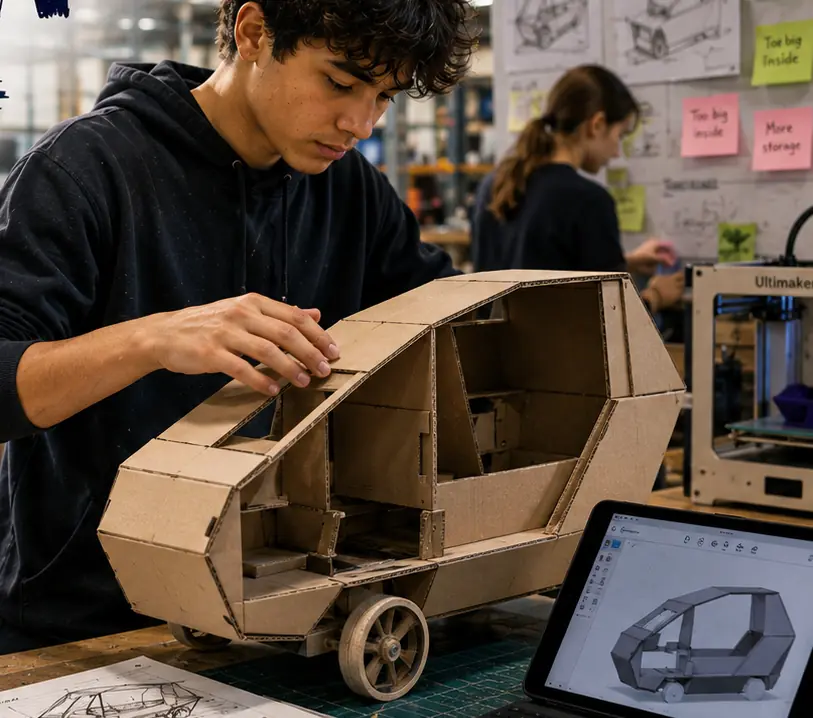
Define the problem in one sentence. Talk to two people it affects. Write three constraints and how you'll know your solution works. Then build a quick low-fidelity prototype from card this week.
Make it yours
Choose a context
Same big question, three different places to explore it. Pick the one that fits your class and community.
An accessible school
Audit the entrance, playground, library or toilets for access barriers. Design a ramp model, a wayfinding system, a sensory-friendly corner or a playground change with students, staff and whānau who use mobility aids, have low vision or find noise hard.
A shared public space
Work with a local park, bus stop, sports club or library. Design seating, shade, a bike rack or a lost-property system for people of all ages. Council or local board staff can tell you the real constraints: cost, vandalism, weather and maintenance.
A low-waste school
Redesign the rubbish and recycling station, a lunchtime food-scrap system or a reusable item library. Your stakeholders are the caretaker, canteen staff, the Enviroschools group and the whole school who has to use it without thinking.
DESIGN
Week by week
Two sessions a week, each with Getting started and Stretch support so the whole class works together.
- W1Find the real problem and the people it affectsDiscover: Stakeholders and barriers · Explore: Constraints and a first rough prototype
- W2Specifications you can testExplore: Accessibility audit and specification · Sketch: Ideas and technical drawing
- W3Build a testable prototype and run round oneSketch: Build to test · Improve: Round one testing
- W4Improve from the evidence and hear from stakeholdersImprove: Analyse, redesign, retest · Give Value: Stakeholder review
- W5Life cycle, trade-offs and the pitchNavigate Constraints: Life cycle and trade-offs · Navigate Constraints: Pitch and hand-over

Hands-on
Activities
Investigations and projects that fit the weeks above. Open one to see what you need and how you'll know it worked.
Accessibility auditHow easy is one part of our school or community to use for everyone?Open
You need: audit checklist · tape measure · spirit level or phone level app · camera for spaces only · clipboard
- Choose one route, e.g. from the gate to the library.
- Measure door clear widths, path widths, steps and ramp slopes (rise ÷ length).
- Check handles, signs, lighting, seating, noise and places to rest.
- Record each barrier with a measurement or photo, and who it affects.
- Compare with the NZ standard guide: ramps no steeper than 1:12, doorways at least 760 mm clear.
How you'll know: Every barrier you list has evidence, and you can say who it affects.
Safety: Work in pairs, stay out of car parks and driveways, and ask before measuring in classrooms or offices.
Go further: Invite someone who uses a wheelchair, pushchair or cane to walk the route with you, if they want to, and compare their experience with your checklist.
Fits week 2 →Specification sprintWhat exactly must our design do, and how will we know?Open
You need: stakeholder notes · spec template · constraint list from the partner
- Turn each need into a measurable 'must', e.g. 'must hold 100 kg without bending more than 5 mm'.
- Add 'should' items (important but not essential) and 'could' items (nice extras).
- Write the test beside each 'must'.
- Add at least one sustainability spec, e.g. 'at least 70% reused material'.
- Check each 'must' with the partner: is it realistic?
How you'll know: Every 'must' has a number or a clear yes/no test.
Go further: Add tolerances: how far off the target can a measurement be and still pass?
Fits week 2 →Ramp gradient challengeHow long does a ramp need to be to climb one step safely?Open
You need: planks or stiff card · books to make a 'step' · ruler · toy car or small trolley · spring scale or rubber band
- Measure the height of your step (the rise).
- Build ramps with slopes of 1:6, 1:8 and 1:12 (length = rise × 6, 8 or 12).
- Pull a loaded toy trolley up each ramp and measure the force with a spring scale or how far a rubber band stretches.
- Record three trials for each ramp and find the median.
- Work out how long a 1:12 ramp would need to be for a real 150 mm step.
How you'll know: Your data shows that gentler slopes need less force but more length, and you can calculate a real ramp length.
Go further: Graph force against slope and explain the trade-off between space and effort.
Fits week 3 →Test data spreadsheetDoes our design meet the spec, and did round two improve on round one?Open
You need: shared spreadsheet · test results · device
- Set up columns: spec, target, trial 1, trial 2, trial 3, median, met?
- Enter every trial, even the odd ones.
- Use a formula to find the median, and an IF formula to show 'met' or 'not met'.
- Add round two in the next columns and make a side-by-side bar graph.
How you'll know: Anyone could read your spreadsheet and see which specs are met, with a graph comparing both rounds.
Go further: Find the range for each test. Which test was least consistent, and why?
Fits week 4 →Life-cycle mapWhat happens to our design from start to finish?Open
You need: an existing product like yours (a bench, bin, sign) · life-cycle template · coloured pens
- Map six stages: raw materials, making, transport, use, repair, end of life.
- At each stage note energy, waste, cost and who does the work.
- Mark the stage with the biggest environmental impact.
- Suggest one change that shrinks that impact.
- Spot any planned obsolescence: parts designed to wear out or be impossible to fix.
How you'll know: Your change targets the biggest impact, with a reason.
Go further: Compare two products that do the same job, e.g. a plastic bench and a timber bench.
Fits week 5 →Build a testable prototypeWhat is the simplest thing we can build that lets us test our most important spec?Open
You need: recycled timber, card or corrugated plastic · hand saw, clamps, drill with adult supervision · safety goggles · screws, cable ties, tape
- Pick the one 'must' that matters most.
- Decide: full size, part full size (just the seat, just the handle) or scale model.
- Mark out from your technical drawing and check measurements twice.
- Cut and join, then check it against the drawing.
- Label which spec each part is meant to meet.
How you'll know: The prototype lets you run a real test on your most important spec.
Safety: Safety goggles for all cutting and drilling; work clamped to a bench; adult supervision for saws and drills; check recycled timber for nails and splinters; no treated-timber sawdust inhaled (cut outside or with a mask).
Go further: Build a second prototype with one change and test both the same way.
Fits week 3 →Stakeholder feedback roundDoes our design work for the people it is meant for?Open
You need: improved prototype · feedback sheet based on the spec · timer
- Invite at least three different stakeholders.
- Ask each to do a real task with the design while you watch.
- Ask them to rate each 'must' and 'should' as met, partly met or not met, and why.
- Record quotes and anything they struggled with.
How you'll know: You have views from at least three different stakeholders, linked to your spec.
Go further: Find one piece of feedback that contradicts another, and explain how you'd balance them.
Fits week 4 →Look closer
From the real world


Background reading
Read to understand
Short readings written for Kōkiri Learn students, with their sources.
- Designing for everyone: universal designWhat accessibility and universal design mean, why designing for people with the most barriers helps everyone, and the numbers designers use in Aotearoa.
- Specifications and test data: proving it worksHow designers turn needs into measurable specifications, run fair and repeatable tests, and use data to make better decisions.
- The life of a product: from raw material to rubbish (or not)Life cycles, planned obsolescence and the circular economy: how designers think about what happens to a product before and after we use it.
Trusted NZ sites
Explore more
Placed at the stage of the journey where each one helps.
Discover
The Double Diamond ↗Design Council
Discover, define, develop, deliver: a map of the whole design process.
Explore
Universal design ↗Auckland Design Manual
How designers in Tāmaki Makaurau plan spaces that work for everyone.
Explore
Ramps and paths for accessibility ↗BRANZ
Real NZ numbers for ramp slopes, path widths and landings.
Sketch
Tinkercad ↗Autodesk
3D models you can measure, rotate and turn into technical views.
Improve
CensusAtSchool resources ↗CensusAtSchool New Zealand
Help with medians, graphs and making sense of your test data.
Give Value
Life cycle analysis ↗Science Learning Hub
How to weigh up a product's impact from start to finish.
Navigate Constraints
Circular economy ↗Science Learning Hub
Design out waste by keeping materials in use.
Real audiences
- The community partner or local business who set the constraints
- The school property team or board of trustees
- Disabled people's organisations or the local accessibility advisory group
Work with other schools
- Share one spreadsheet template for test data so classes in different schools can compare results for similar designs.
- Run a joint accessibility audit week with partner schools and publish a combined map of barriers and fixes.
- Swap pitches over video: each school critiques another's evidence using 'I agree because… / Have you tested…?'
- Invite an architect, engineer or occupational therapist to review pitches from several schools in one online session.
Stretch challenges
- Build a full-size version with the community partner, a local business or a whānau builder.
- Add a micro:bit or sensor to count how often your design is used and collect a week of data.
- Present your pitch and evidence to the board of trustees or the local board.
- Research an accessible design that changed a city (kerb cuts, tactile paving, captions) and trace how it helped people it wasn't designed for.
New Zealand Curriculum
What this world covers
Mapped to the refreshed Phase 3 statements. The whole class covers both the Year 7 and Year 8 sequences over two years.
Technology · Design and innovation
Working iteratively with stakeholders to test assumptions; balancing purpose, function, aesthetics and sustainability; planned obsolescence and life cycle impacts; technical drawings with dimensions
Year 8 sequence
Technology · Materials and ingredients
Writing specifications with performance measures and tolerances; reliable tests and trials; analysis of failure informing redesign
Year 8 sequence
Technology · Digital technologies
Using a spreadsheet to organise test data, find patterns and graph results
Year 8 sequence
Mathematics and Statistics · Statistics
Comparing two rounds of results using median and range; choosing a suitable graph
Year 8 sequence
Mathematics and Statistics · Measurement
Finding missing lengths and gradients in practical situations; scale drawings
Year 8 sequence
English · Oral language
Presenting counter-arguments with evidence in a pitch to a real audience
Year 8 sequence
For teachers: how to run it
Prep: secure one community partner before week 1 (property manager, caretaker, local board member, club committee or Enviroschools facilitator) who will set the real constraints in week 1 and hear pitches in week 5. Book the workshop or maker space for week 3 and brief on hand tools: safety goggles, clamps, saws only on a bench with adult supervision, no power tools unless your school's policy and training allow it. Accessibility work: invite, don't assume. Ask students, staff or whānau with lived experience of disability if they want to be co-designers and pay attention to their time and privacy; never ask students to simulate a disability for fun. Photograph spaces, not people. If a context touches a marae, urupā or wāhi tapu, go through mana whenua and the school's own iwi relationships first. Data: set up one shared spreadsheet template (test, trial 1–3, median, meets spec?) so every group can graph results; link to maths statistics lessons on median and range. Differentiation: supported learners choose a spec from a bank and test one 'must' with a partner; extension learners write tolerances (e.g. 760 mm ± 5 mm), build a digital model in Tinkercad, or add a micro:bit counter to collect usage data. Pūkeko, the AI companion, asks one question about evidence; it never writes specs or pitches. Kōkiri Lab links: Robotics and Systems for sensors; the Kōkiri Lab design journals work well for iteration logs.
This world is live in Kōkiri Learn: students record each stage, and your dashboard shows who has started and where they are, never rankings or scores.
More Technology worlds
4 weeksTe Hoahoa Otinga: Designing Solutions
5 weeksKai Lab: Food Technology
5 weeksBuild It Strong: Structures and Mechanisms
5 weeksSmart Circuits: Electronics and Control
5 weeksCode a Game: Algorithms and Debugging
5 weeksData Detectives: Data, Spreadsheets and AI
5 weeksGrow It: Aquaponics and Sustainable Systems
Ready to run it with your class?
Free trial for NZ schools. One combined Years 7–8 class, any term.