Technology · World 1 of 8 · Years 7–8
Te Hoahoa Otinga: Designing Solutions
Find one real person with an everyday problem, dig for the real cause, then build, test and improve something that helps.
Big question: How do designers make sure they are solving the right problem for a real person?
- You'll make
- A tested prototype for one real user, plus a design story (photos, sketches, test notes and the changes you made) that you hand over to them.
- For
- Your real user and their whānau, then a school design showcase
- Time
- 4 weeks · 2 sessions a week
Your mission
Why it matters
Someone near you has a small, stubborn problem: a new entrant who can't reach the bag hooks, a koro whose hands ache when he opens jars, a coach who loses the bibs every Saturday. They have probably put up with it for ages. Your job is to understand their problem better than anyone has before, then design, test and improve something that genuinely helps them.
Lots of products fail because they solve the wrong problem. Designers who listen first, ask 'why?' and test early make things people actually use. These are the same skills that help you work in a team, make decisions and fix problems anywhere in life.

Your first step
Choose a person with a problem and interview them. Ask about the last time the problem happened. Write their needs as 'needs to…' statements, not solutions. Then sketch three different ways you might help.
Make it yours
Choose a context
Same big question, three different places to explore it. Pick the one that fits your class and community.
The junior school
Work with a younger class. Bag hooks that are too high, lunchboxes that won't open, reading books that go missing, a messy mat-time area. Your users are small, honest testers who will show you straight away what doesn't work.
Home and whānau
Design for a kaumātua, a parent or a younger sibling. A jar opener for sore hands, a medicine reminder, a better way to hang washing, a gadget holder for the car. You can visit and test with them, and they can tell you if it works at home.
A community place
Partner with a local sports club, kindergarten, marae kitchen, library or community garden. A tidy system for club gear, a tool rack for the garden shed, a sign-in board for volunteers. Ask the people who run it what slows them down.
DESIGN
Week by week
Two sessions a week, each with Getting started and Stretch support so the whole class works together.
- W1Meet your user and find the real problemDiscover: Symptom or root cause? · Explore: Needs, existing solutions and a brief
- W2Lots of ideas, then one to buildExplore: Crazy eights and team roles · Sketch: Annotated sketches and a first model
- W3Test with your user and make it betterImprove: The user test · Improve: Build version two
- W4Show the value and explain the trade-offsGive Value: Does it meet the need? · Navigate Constraints: Trade-offs and hand-over

Hands-on
Activities
Investigations and projects that fit the weeks above. Open one to see what you need and how you'll know it worked.
Five whys detectiveWhat is the real cause behind the problem?Open
You need: a problem statement from your user · sticky notes · a partner
- Write the problem on the top sticky note, e.g. 'The club's bibs go missing.'
- Ask 'why?' and write the answer on the next note underneath.
- Repeat until you have asked 'why?' five times, or you reach something you could change.
- Circle the root cause. Cross out any 'solutions' that only fix a symptom.
- Check with your user: does this root cause sound right to them?
How you'll know: Your root cause is something you can design for, and your user agrees it is the real issue.
Go further: Try the council park challenge: the park is empty and the council wants a new playground. List four ways to find out if a playground is really the problem.
Fits week 1 →Empathy interviewWhat does my user really need?Open
You need: interview question card · notebook or recording device (with permission) · an adult present for off-site interviews
- Ask permission to take notes, and explain you are learning about the problem, not selling anything.
- Start with 'Tell me about the last time…'. Let silences sit; people often add the useful bit after a pause.
- Ask 'why?' at least twice, and 'Can you show me?' once.
- Write down exact words and anything you see them do that they didn't mention.
- Write three needs starting 'needs to…'.
How you'll know: Each need describes the problem, not a product. 'Needs to open jars without twisting hard' is a need; 'needs an electric jar opener' is a solution.
Go further: Watch your user do the task for five minutes without talking, and list three things they didn't say out loud.
Fits week 1 →Decider, Devil's Advocate, DoerHow can a team move from talking to making?Open
You need: timer · role cards · paper and pencils
- In threes, give each person a role card: Decider, Devil's Advocate, Doer.
- Brainstorm for three minutes: design a new school uniform using only three colours.
- The Devil's Advocate respectfully points out what could go wrong with each idea.
- The Decider must choose the colours by minute four.
- The Doer finishes a labelled sketch by minute ten. Swap roles and try again with a real design decision.
How you'll know: Your team made a decision on time, and everyone can say how their role helped.
Go further: Talk about it: in Aotearoa teams often aim for everyone to agree. When is agreement worth waiting for, and when is a quick decision better?
Fits week 2 →Crazy eightsHow many different ways could we meet this need?Open
You need: A4 paper folded into eight · pencil · timer
- Fold the page into eight boxes.
- Set a timer for eight minutes: one idea per box, one minute each.
- Make each idea different: something to wear, something to hold, something on a wall, something digital.
- Star the two ideas your user is most likely to use every day.
How you'll know: You have eight genuinely different ideas, not eight versions of the same one.
Go further: Combine the best parts of two ideas into a ninth.
Fits week 2 →Material strength testWhich material is strong enough for our prototype?Open
You need: strips of card, corrugated card, plastic from packaging and paper, all the same size · two desks · coins or washers as weights · ruler
- Cut each material to the same size strip, e.g. 30 cm by 5 cm.
- Bridge each strip across a 20 cm gap between two desks.
- Add weights one at a time until the strip sags 2 cm.
- Record the number of weights for each material in a table.
- Fold or roll your weakest material and test again.
How you'll know: A fair test keeps the strip size and gap the same, so only the material changes.
Safety: Keep feet clear when weights fall; use scissors, not craft knives, for thin card.
Go further: Work out which material gives the most strength for the least weight.
Fits week 2 →Silent user testWhat happens when the real user tries our prototype?Open
You need: your prototype · test plan · clipboard · camera for hands and prototype only
- Tell your user the task, e.g. 'Hang your bag and get your lunch out.'
- Hand over the prototype and say nothing. No explaining, no helping.
- Record every hesitation, workaround and comment.
- Afterwards ask: 'What was the hardest part?' and 'What would you change?'
- Sort notes into worked / didn't work / surprised us.
How you'll know: You have notes of what your user did, not just what they said, and one clear change to make.
Safety: Check the prototype for sharp edges, loose staples and hot-glue strings before a young child or older person uses it.
Go further: Run the same test with a second user and see if the same problem shows up.
Fits week 3 →Upcycle challengeCan we make our final version from things that would have been thrown away?Open
You need: clean recycled materials (tubes, boxes, fabric, lids) · low-temperature glue gun with adult · masking tape · scissors
- List the parts your design needs and what each part must do.
- Hunt the recycling for a material that does each job.
- Build version two using only recycled materials plus joiners.
- Test it against your 'needs to…' statements.
How you'll know: It still meets the need, and you can say what each recycled material replaced.
Safety: Glue guns only at the supervised station; rinse and check recycled containers for sharp edges.
Go further: Weigh the materials you used and estimate how much would have gone to landfill.
Fits week 3 →Trade-off tableWhat did our design give up, and was it worth it?Open
You need: design story · trade-off table template
- List the main decisions you made (material, size, shape, how it attaches).
- For each, write what you gained and what you gave up.
- Mark which constraint (size, time, cost, safety, sustainability) forced the choice.
- Ask your user if the trade-off was the right one for them.
How you'll know: Every trade-off has a reason linked to a constraint or to test evidence.
Go further: Suggest one trade-off you would make differently with more time or money.
Fits week 4 →Look closer
From the real world

Background reading
Read to understand
Short readings written for Kōkiri Learn students, with their sources.
- Needs, not solutions: designing for a real personWhy good design starts by listening to one real person, and how to turn what they say into needs you can design for.
- Solving the right problemSymptoms, root causes and the five whys: how problem solvers make sure they fix the real problem, not just the obvious one.
- Prototypes: make it rough, test it earlyWhy designers build quick, cheap prototypes, how teams decide fast, and what famous inventors learned from their mistakes.
Trusted NZ sites
Explore more
Placed at the stage of the journey where each one helps.
Discover
The Double Diamond ↗Design Council
A simple picture of how designers discover the real problem before they design.
Explore
Design Kit: the human-centred design toolkit ↗IDEO
Methods for interviews, observation and idea generation.
Explore
Introducing innovation ↗Science Learning Hub
How New Zealand innovators find needs and turn ideas into products.
Sketch
Wētā house prototype ↗Science Learning Hub
South Auckland students designed a prototype that better meets a real user's needs: tree wētā.
Sketch
Tinkercad ↗Autodesk
Free 3D modelling in your browser for measured models.
Give Value
The 'no. 8 wire' tradition ↗Te Ara Encyclopedia of New Zealand
Kiwi inventors who fixed everyday problems with what they had.
Navigate Constraints
Rethinking plastics ↗Science Learning Hub
Think about the whole life of the materials you choose.
Real audiences
- Your user and their whānau at a hand-over
- A school design showcase or open evening
- The junior class, club or community group that shared the need
Work with other schools
- Swap design briefs with a class at another school: each class interviews its own user, then the other school designs for them over video.
- Hold an online design critique where partner schools give 'I like, I wonder, what if' feedback on each other's prototypes.
- Build a shared bank of empathy-interview questions and user-test templates that classes add to each term.
- Invite a local designer, engineer or occupational therapist to review prototypes with several schools at once.
Stretch challenges
- Make a second version for a different user with a similar need, and compare what changed.
- Write a simple step-by-step instruction sheet with diagrams so someone else could build it.
- Research a designer who started with observation, like George de Mestral (Velcro) or James Dyson (bagless vacuum), and compare their process with yours.
- Add a digital part, such as a micro:bit reminder or a Tinkercad model ready for a 3D printer.
New Zealand Curriculum
What this world covers
Mapped to the refreshed Phase 3 statements. The whole class covers both the Year 7 and Year 8 sequences over two years.
Technology · Design and innovation
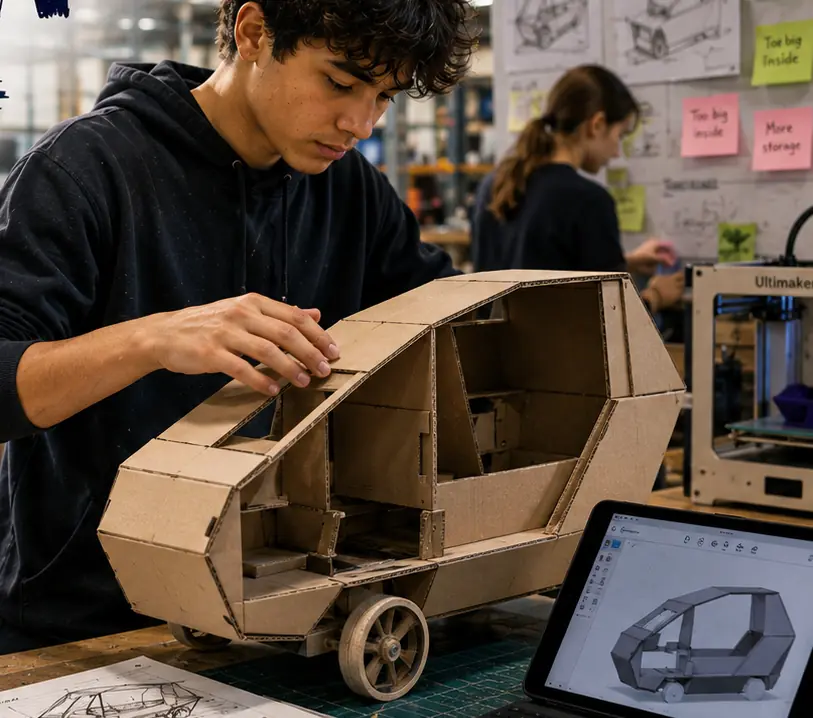
Human-focused design: co-constructing a brief with a stakeholder, divergent then convergent thinking, annotated sketches and models, testing and improving with feedback
Year 7 sequence
Technology · Materials and ingredients
Functional modelling; choosing materials by properties (strength, flexibility) and feasibility; safe techniques; recycled and sustainable materials
Year 7 sequence
English · Oral language
Open questions that test assumptions in an empathy interview; roles in group discussion (Decider, Devil's Advocate, Doer)
Year 7 sequence
Mathematics and Statistics · Measurement
Measuring the user and the space in millimetres; scale for sketches and models
Year 7 sequence
Health and Physical Education · Health: relationships
Empathy and decision-making when designing for someone else
Year 7 sequence
For teachers: how to run it
Prep: line up real users before week 1 (a junior teacher who will lend a class, whānau volunteers, or one community group) and get consent for students to interview, photograph hands and prototypes (not faces) and return to test. Collect clean recycled card, tubes, fabric scraps, pegs, string and masking tape; a craft-knife station and a low-temperature glue gun station with adult supervision, cutting mats and a safety briefing before any tool is used. Teach need-finding before any making: the Harakeke 'Solving the Right Problem' ideas (symptom vs root cause, five whys, the slow-lift mirrors story, the bike-shop backlog) work well as the week 1 hook, and the 'Making Decisions' roles (Decider, Devil's Advocate, Doer, rotating each task) stop groups stalling in week 2. Protocols: users are experts on their own lives; students ask permission, never promise a finished product, and share the design story back. When working with a marae or kaumātua, go through the school's own iwi relationships and follow the host's tikanga. Differentiation: supported learners can work in pairs on one user with a question card and sentence starters ('needs to…', 'I noticed…'); confident learners interview two users and compare, or add a digital part (a Tinkercad model or a micro:bit reminder). Pūkeko, the AI companion, asks one question about a design change; it never designs or judges the work. Kōkiri Lab links: the Robotics and Systems world extends the 'add a sensor' stretch.
This world is live in Kōkiri Learn: students record each stage, and your dashboard shows who has started and where they are, never rankings or scores.
More Technology worlds
5 weeksDesigning for Our Community
5 weeksKai Lab: Food Technology
5 weeksBuild It Strong: Structures and Mechanisms
5 weeksSmart Circuits: Electronics and Control
5 weeksCode a Game: Algorithms and Debugging
5 weeksData Detectives: Data, Spreadsheets and AI
5 weeksGrow It: Aquaponics and Sustainable Systems
Ready to run it with your class?
Free trial for NZ schools. One combined Years 7–8 class, any term.